
Cloud computing has made it much easier to store data, run applications, manage websites, and scale digital services without having to handle everything on physical machines. But there is one problem that many teams eventually run into: there are still a lot of repetitive tasks to manage.Creating resources, backing up data, checking systems, deploying updates, monitoring usage, adjusting capacity, and cleaning up unused resources can quickly become a daily routine. And when people have to do the same thing again and again, mistakes are bound to happen. This is where cloud automation comes in.
Cloud automation is basically about letting software handle repetitive cloud tasks automatically instead of requiring someone to manually perform every step. It can save time, reduce human error, and make cloud operations much easier to manage.
The good thing is that you don’t need to automate everything at once. Even a few small automations can make a noticeable difference.
What Is Cloud Automation?

In simple words, cloud automation means using software, scripts, tools, or predefined workflows to automatically perform tasks in a cloud environment. Think about a task that you normally perform every Monday.
Maybe you create a backup. Maybe you check server resources. Maybe you turn off development environments after working hours. Maybe you deploy the latest version of an application. If that task follows the same basic steps every time, there is a good chance it can be automated.
Instead of someone remembering to do it, an automation workflow can take care of it based on a schedule, event, condition, or predefined instruction.
That doesn’t mean humans become unnecessary. Quite the opposite. People can spend less time clicking through repetitive menus and more time dealing with actual problems, improvements, and decisions.
Why Automate Everyday Cloud Tasks?
Let’s be honest: repetitive cloud administration isn’t exactly the most exciting part of technology.
Doing something once isn’t a big deal. Doing it 50 times is where things start getting tiring. Automation helps by taking those predictable tasks off your daily to-do list.
Some common benefits include:
- Less manual work
- Faster execution of repetitive tasks
- Fewer human errors
- More consistent processes
- Better use of team time
- Easier scaling
- More reliable deployments
- Improved resource management
- Better visibility into cloud operations
The biggest benefit for many teams is simply peace of mind.
When an important routine task is automated and properly tested, you don’t have to rely entirely on someone remembering to do it at the right time.
Start With Small Tasks
One mistake businesses sometimes make is trying to automate everything immediately.
That’s usually unnecessary.
A better approach is to look at your current cloud workflow and find the tasks that are repetitive, predictable, and time-consuming. For example, if your team spends 30 minutes every day checking the same resources, that’s a good automation candidate. If developers regularly forget to shut down temporary environments, that could also be automated.
If backups have to happen every night, scheduling them makes more sense than asking someone to remember every evening.
Start small, see what works, and then gradually expand.
Automate Cloud Resource Creation

Creating cloud resources manually can become frustrating when the same setup needs to be repeated.
Imagine a development team that needs similar environments for different projects. Someone could manually create the required servers, networks, permissions, storage, and other resources every time. That takes time and also creates opportunities for inconsistent configurations. With infrastructure automation, teams can define what an environment should look like and use that definition to create it repeatedly. This is one of the reasons Infrastructure as Code (IaC) has become such an important part of modern cloud operations.
Instead of treating infrastructure as something you manually build, you can describe it in configuration files and use automation tools to create and manage it.
Automate Backups
Backups are one of those things everyone knows are important but nobody wants to keep doing manually. Cloud automation can help schedule regular backups according to the needs of an application or business.
For example, a company might create daily backups for important data and retain them for a specific period. The exact backup strategy depends on the system, but automation can make the process more consistent. And that’s important because a backup that exists only in someone’s memory isn’t really a reliable backup strategy.
It’s also important to test backups regularly. Automation should not simply create backup files; teams should make sure those backups can actually be restored when needed.
Automate Cloud Monitoring
Cloud environments can generate a huge amount of information.
CPU usage, memory, storage, network traffic, application errors, response times, and other metrics can all change throughout the day. Nobody wants a person sitting in front of a dashboard 24/7 waiting for something unusual to happen. Automation can monitor these signals and trigger actions when certain conditions are met.
For example:
High CPU usage → Send an alert
Storage almost full → Notify the team
Service becomes unavailable → Trigger a recovery workflow
Unusual activity detected → Start a security response
This doesn’t mean every alert should automatically trigger a major action. Some situations need human review. The key is to let automation handle the predictable parts while people deal with the situations that require judgment.
Automate Application Deployments
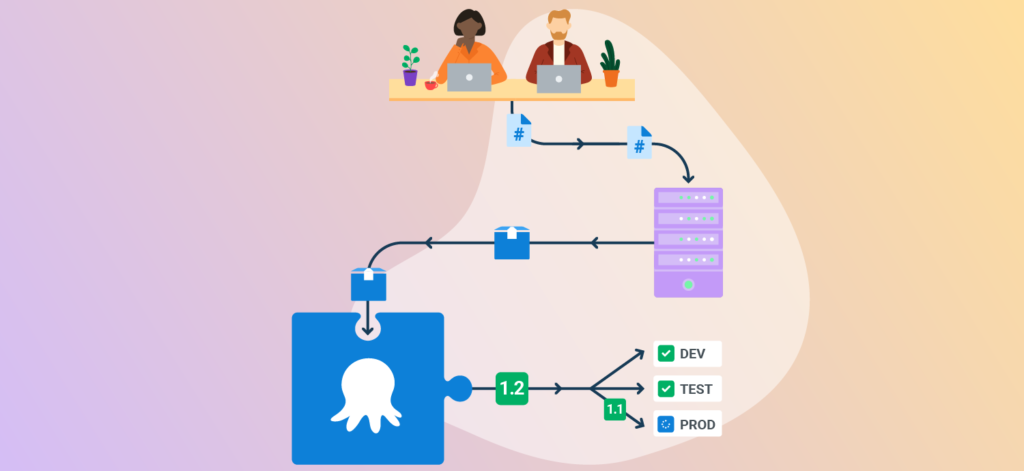
Application deployment is another area where automation can make a huge difference. Without automation, a developer might have to manually move code between environments, update files, restart services, check configurations, and perform several other steps. It’s not only slow; it’s also easy to miss something. Automated deployment pipelines can connect different stages of the development process. A simplified workflow might look like:
Code Change → Testing → Build → Deployment → Monitoring
Once the workflow is properly configured, a new code change can move through the required stages with much less manual involvement.
This is a major part of CI/CD, which stands for Continuous Integration and Continuous Delivery or Deployment.
Automate Resource Scaling
Cloud environments are popular partly because resources can be adjusted as demand changes.
But manually increasing or decreasing resources every time traffic changes isn’t practical.
Automation can help applications respond to changing demand.
For example, an online store might receive significantly more traffic during a major sale. Instead of keeping the same capacity all year, automated scaling can add resources when demand increases and reduce them when demand falls.
This can help businesses balance performance and cost.
The important part is setting sensible rules. Poorly configured scaling can create unnecessary costs or cause performance issues, so automation should always be monitored and reviewed.
Automate Cloud Cost Management
Cloud bills can become surprisingly complicated.
A team might create a temporary server for testing and forget to remove it. Another unused storage resource might continue generating charges. A development environment might stay active overnight even though nobody is using it.
These small things can add up.
Automation can help identify or handle some of these situations.
For example, a company could create rules to:
- Shut down non-production resources outside working hours
- Identify unused resources
- Alert teams about unexpected spending
- Monitor budgets
- Tag resources by project
- Generate regular cost reports
The goal isn’t simply to spend as little as possible.
It’s about making sure cloud resources are being used intentionally.
Automate Cloud Security Tasks

Security should never be treated as something that can simply be switched on and forgotten.
But several security-related tasks can benefit from automation.
For example, automated workflows can help monitor unusual activity, check configurations, rotate certain credentials according to established policies, or alert security teams when suspicious events occur.
Automation can also help enforce standard security configurations across environments.
Still, this is an area where caution matters.
A poorly designed automated security rule can accidentally block legitimate users or disrupt an application. Security automation should therefore be tested carefully and monitored after deployment.
Automate Environment Cleanup
Temporary cloud environments are incredibly useful for development and testing.
The problem starts when they are forgotten. A test environment that should have existed for two hours can sometimes remain active for weeks.
That’s not just messy. It can also increase cloud costs and make the infrastructure harder to understand. A simple cleanup workflow can automatically remove temporary resources after a defined period.
For example:
Create temporary environment → Add expiration tag → Monitor age → Remove after expiration
Of course, production resources should never be deleted simply because a generic cleanup rule exists. Proper tagging, permissions, exclusions, and approval processes are essential.
Use Scheduling for Routine Tasks
Not every automation needs to respond to an event.
Some tasks simply need to happen at a specific time.
Scheduling can be useful for things such as:
- Running backups
- Generating reports
- Starting development environments
- Stopping unused resources
- Running maintenance jobs
- Processing data
- Sending notifications
- Performing routine checks
A schedule turns a task from something someone has to remember into something the system can execute automatically.
But it’s still worth reviewing scheduled jobs occasionally. An automation created six months ago may no longer be necessary, especially if the surrounding system has changed.
Automate Data Processing
Cloud platforms are often used to handle large amounts of data.
Manually processing that information can take a lot of time, especially when the same steps are repeated regularly.
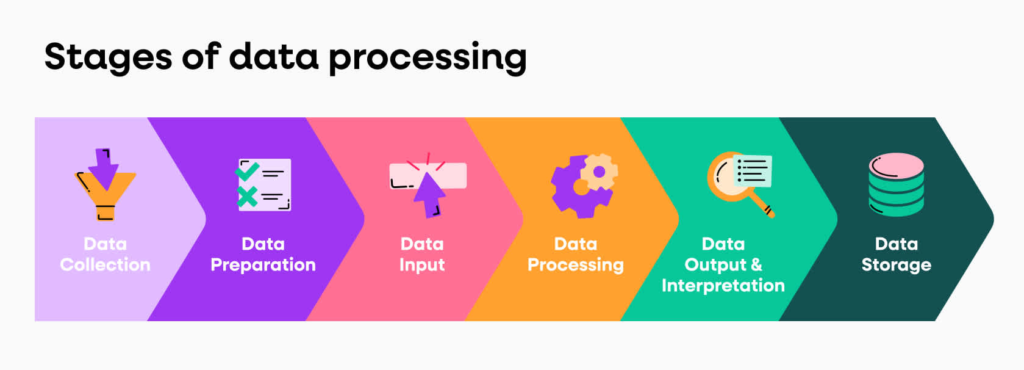
Automation can move data through predefined workflows.
For example:
Data Received → Validation → Processing → Storage → Report
This type of workflow can be useful for businesses dealing with customer data, analytics, logs, transactions, or other recurring information.
The exact process depends on the business, but the basic idea stays the same: once the steps are predictable, they can often be automated.
Use Infrastructure as Code
If you’re serious about cloud automation, Infrastructure as Code is a concept worth understanding. Instead of manually configuring cloud infrastructure through a dashboard, IaC allows teams to define infrastructure using configuration files. That makes environments easier to reproduce and manage.
For example, if a development environment needs a specific set of resources, the configuration can describe those requirements. The same configuration can then be used to create another similar environment. Popular Infrastructure as Code approaches include tools such as Terraform, AWS CloudFormation, Azure Resource Manager templates, and Pulumi.
The specific tool isn’t as important as the principle: define infrastructure in a repeatable way instead of rebuilding it manually every time.
Connect Cloud Automation With DevOps
Cloud automation and DevOps naturally work well together.
DevOps focuses on improving collaboration between development and operations while making software delivery faster and more reliable.
Automation supports that goal by reducing repetitive manual steps.
A modern workflow might include:
Developer writes code
↓
Automated tests run
↓
Application is built
↓
Infrastructure is prepared
↓
Application is deployed
↓
System is monitored
↓
Alerts are triggered when something needs attention
The more predictable the workflow becomes, the more opportunities there are for useful automation.
Don’t Automate Everything Just Because You Can

This is probably one of the most important points.
Automation is useful, but more automation doesn’t automatically mean a better system.
Some tasks genuinely need human judgment.
If a task is performed once every few months and takes five minutes, spending days building an automation for it might not make sense.
Before automating something, ask:
- How often does this task happen?
- How much time does it take?
- Is the process predictable?
- What happens if the automation fails?
- Can the action be safely reversed?
- Does it need human approval?
- Will the automation save more time than it takes to maintain?
These questions can help teams avoid creating unnecessary complexity.
Keep Human Approval Where It Matters
The best cloud automation isn’t necessarily the one that does everything without asking anyone. For important or potentially destructive actions, a human approval step can be a smart safety measure. For example, automatically deploying a routine update to a testing environment may be perfectly reasonable.
Automatically deleting a production database because a rule was triggered is obviously a different story.A useful approach is to automate the low-risk parts while keeping human approval for high-impact decisions.
Monitor Your Automations
One common mistake is creating an automation and then forgetting about it.
That’s risky.
Automations can fail because of changed permissions, expired credentials, altered APIs, configuration changes, software updates, or unexpected conditions.
Every important automation should have some level of monitoring.
You should know:
Did the task run?
Did it finish successfully?
If it failed, who was notified?
Can the action be retried?
Is there a way to undo it?
Automation should reduce work, not create a hidden source of problems.
A Simple Cloud Automation Example

Imagine a company has development servers that employees use only during working hours.
Without automation, someone might manually shut them down every evening.
With automation, the workflow could be:
6:00 PM → Check development servers
↓
Identify non-production resources
↓
Confirm approved shutdown tags
↓
Stop eligible servers
↓
Send completion report
Then, the next morning, another scheduled workflow can start the required resources.
This is a very simple example, but it shows the real value of cloud automation.
Nobody has to remember the task every day.
How to Get Started With Cloud Automation

If you’re new to cloud automation, don’t start by trying to redesign your entire infrastructure. Start with one annoying repetitive task.
Maybe it’s backups. Maybe it’s resource cleanup. Maybe it’s deployment. Maybe it’s generating reports. Maybe it’s shutting down unused development environments. Once you’ve identified a good candidate, document the current manual process first. Then ask which steps can be handled automatically.
Build the automation in a safe environment, test it properly, monitor the results, and only then expand it. Over time, those small improvements can turn into a much more efficient cloud workflow.
FAQ’S
1. What is cloud automation in simple words?
It’s basically a way to let software handle those boring, repetitive cloud jobs that you’d rather not keep doing yourself.
2. Why is cloud automation actually useful?
Because small tasks add up. Automating them can save time, reduce forgetful mistakes, and leave your team free to focus on more important work.
3. What kind of cloud tasks can I automate?
You can automate things like backups, deployments, monitoring, scaling, security checks, cost alerts, and cleaning up resources nobody is using anymore.
4. Do I need to be a cloud expert to get started?
Not at all. Start with one simple task you already understand, get that working properly, and then slowly move on to bigger and more complicated workflows.
5. Does automation mean people are no longer needed?
Nope. Automation takes care of predictable tasks, while people still make decisions, handle unexpected problems, and approve important changes.